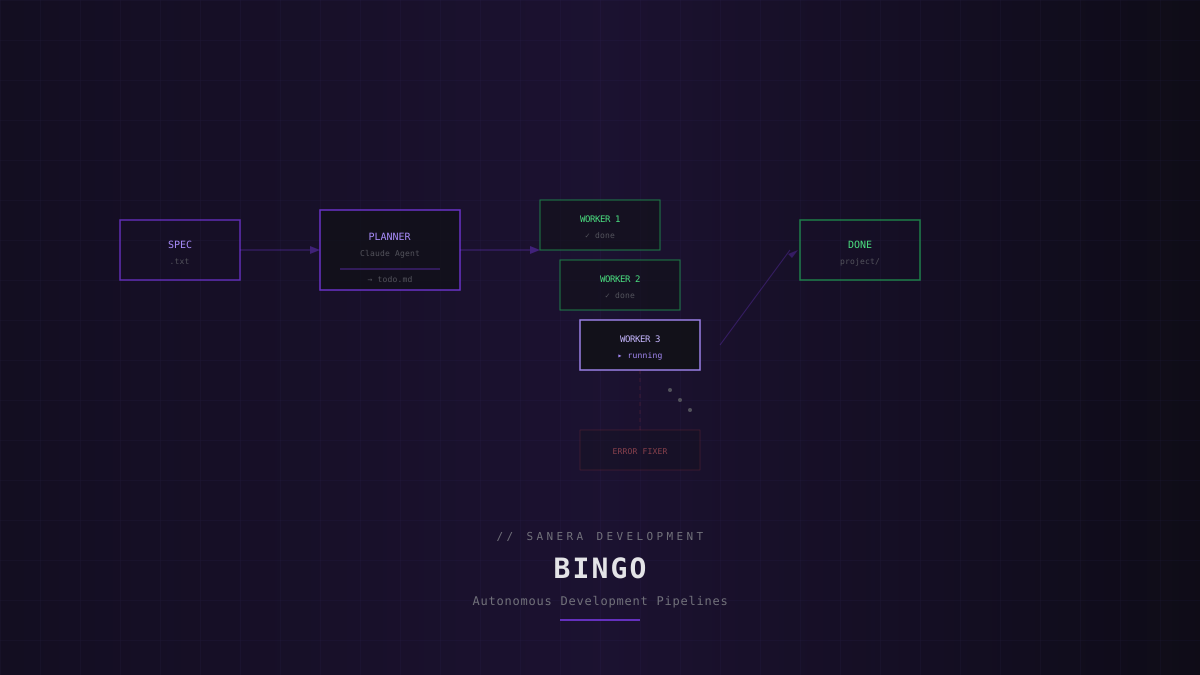
We have been building something internally at Sanera that we are now ready to talk about. It is called Bingo. a shell-based framework that wraps the Claude Code CLI to run autonomous, multi-step software development pipelines.
Hand it a project specification: a text file or a short description, and Bingo will plan the work, break it into tasks, and execute them one by one without manual intervention. When something breaks, it self-corrects. When context gets too large, it hands off cleanly to a fresh agent. When a task gets stuck, it escalates to a dedicated error fixer.
// How it works
Bingo operates in two phases. A planner agent reads your spec and produces a dependency-ordered task list. Then a worker loop picks up each task, builds context, and hands it to a fresh Claude agent for execution.
Spec --> [Planner] --> todo.md --> [Worker 1] --> [Worker 2] --> ... --> DoneEach worker completes its task, marks it done, and the loop moves to the next. This continues until every task is checked off or a task gets blocked after exhausting retries.
// Key mechanisms
- Context handoff: When the context window fills up, Bingo resets the session and transfers state to a new agent via a handoff file. No work is lost.
- Retry and blocking: If a worker fails a task, it retries up to 3 times. After that, the task is marked as blocked and the loop moves on to unblock downstream work.
- Error pit stop: When a worker flags an error it cannot solve, a separate “error fixer” agent gets a fresh context to diagnose and resolve the issue before the worker loop continues.
- Session continuity: Uses Claude's
--resumeflag to maintain conversation context across worker iterations within the same phase. - Skills system: SKILL.md files define project standards: design tokens, coding conventions, architecture decisions. Workers receive these as context and follow them as source of truth.
// Usage
Getting started is straightforward. Scaffold a project, write a spec, and run:
# Create a new project
./setup.sh my-app

# Run the full pipeline with a spec file
./bingo_loop.sh project_spec.txt

# Or with an inline description
./bingo_loop.sh -d "Build a REST API with auth and CRUD endpoints"

# Run with the tmux monitor for a visual dashboard
./bingo_tmux.sh project_spec.txt
The tmux dashboard gives you a three-pane view: the agent loop on the left, live Claude streaming on the top right, and token usage plus task progress on the bottom right.
// Architecture
bingo_loop.sh          Main script: planner + worker loop + CLI
bingo_tmux.sh          Tmux UI with split panes
setup.sh               Scaffold a new project

templates/
  PLANNER_PROMPT.md    System prompt for the planner agent
  WORKER_PROMPT.md     System prompt for worker agents
  ERROR_FIXER_PROMPT.md  System prompt for the error fixer

lib/
  response_analyzer.sh Parse Claude's JSON output
  todo_utils.sh        Read/write/query todo.md
  token_utils.sh       Track token usage per iteration
  stuck_detection.sh   Detect looping agents
The entire system is shell-based no Node runtime, no Python dependencies. It wraps the Claude Code CLI directly, which means it inherits all of Claude's tool use capabilities: file reading, writing, command execution, and browser interaction.
// Why we built it
We started Bingo because we kept solving the same problem: taking a well-defined spec and turning it into working code through a predictable series of steps. The individual steps were not hard. Claude handles them well. The orchestration was the missing piece.
Bingo is that orchestration layer. It handles the boring parts: task sequencing, context management, error recovery, progress tracking so the AI can focus on the actual building.
// What is next
Bingo is still in active development. We are using it internally on client projects and refining the pipeline based on real-world feedback. We will share more details including performance data and case studies as the project matures. Stay tuned.